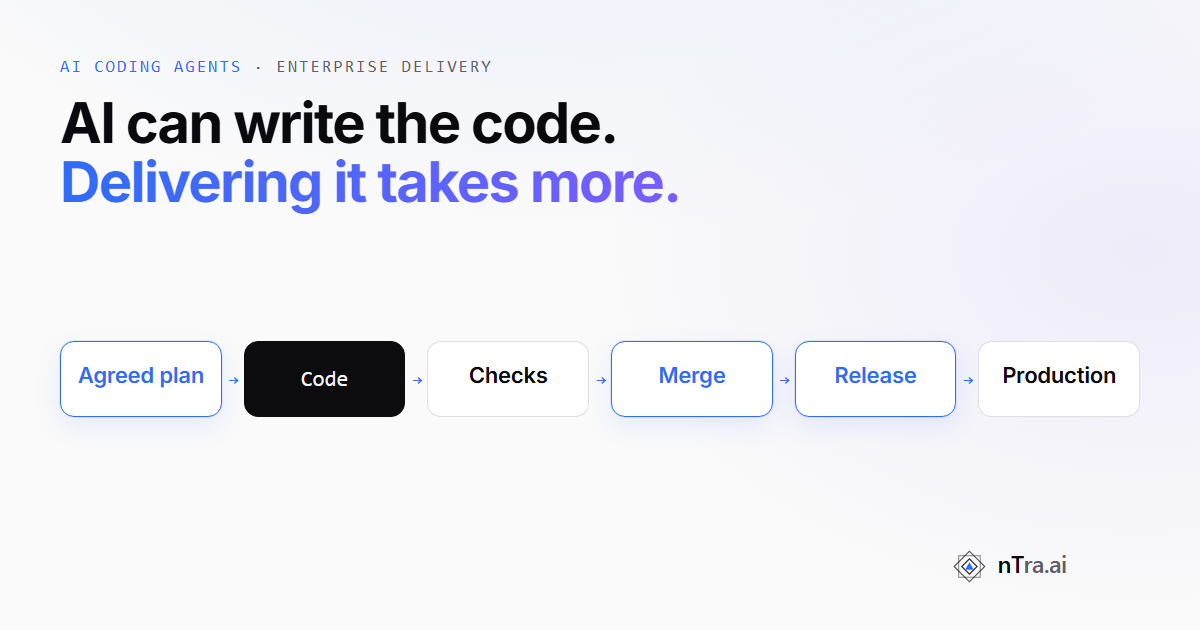
The missing steps between an AI-written change and a system you can safely run in production.
Picture a Tuesday at a company that sells software to other businesses. A coding agent finished a feature overnight. The change looks clean. Every test is green. A reviewer approves it before lunch.
On Thursday, a support ticket arrives. A manager at one client company could see approval requests from a different client. Nothing in the test run looked for that.
This is not a story about a bad agent. The agent did what it was asked. The trouble is everything around the code that nobody asked it to prove.
The research points the same way. Google's DORA team surveyed nearly 5,000 technology professionals in 2025. Ninety percent of them use AI at work. More AI use now goes with faster delivery, but it still goes with less stable delivery. DORA's own summary: AI "amplifies what's already there" (DORA, September 2025).
Developers feel it too. In the Stack Overflow Developer Survey 2025, 66% named "AI solutions that are almost right, but not quite" as a frustration. And 45.2% said fixing AI-written code takes more time. More developers distrust the accuracy of AI tools (46%) than trust it (33%).
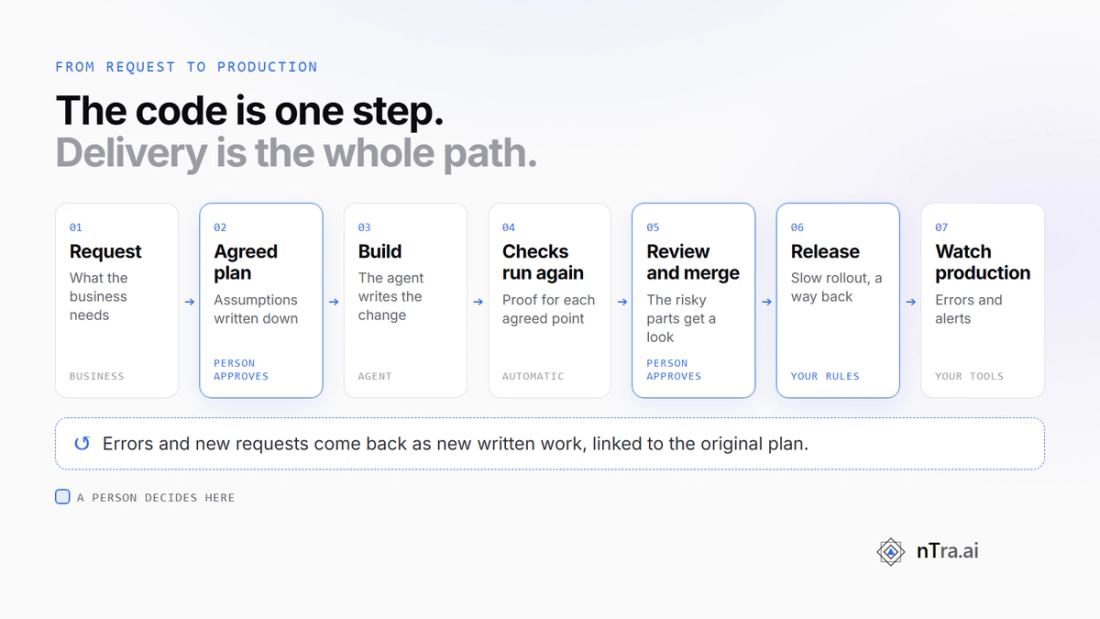
So the question for a buyer is not "can the agent write code?" It can. The question is what has to be true before that code reaches your customers. Here are six questions to ask, and the path a change takes from request to production.
What does a successful coding agent actually deliver?
Most demos end at a change that runs and passes its tests. For a product team, that is the middle of the job, not the end.
A delivered feature does what the business asked. It keeps old behaviour working, keeps data safe, reaches production and stays healthy there. Today each of those has an owner: a product manager, a reviewer, a security lead, a release engineer, someone on call.
When an agent writes the code, those people do not go away. Their checks just have to happen faster, on more changes. If they don't, the queue simply moves from writing to reviewing.
METR saw a version of this. In a 2025 study, 16 experienced open-source developers took 19% longer on 246 real tasks with AI tools. They had expected to be 24% faster. Afterwards, they still believed they had been 20% faster (METR, July 2025).
METR now calls those results out of date, and published newer data in February 2026. The lesson that lasts is simpler: feeling faster and delivering faster are different things to measure.
Why do requirements, business context and existing systems complicate autonomous coding?
An agent reads the task and the code it can see. It was not in the meeting where sales promised a client something. It does not know which old screen a large account still uses every day.
So it fills the gaps with guesses. A guess that sounds reasonable is the hardest kind to catch in review, because the code around it is usually fine.
Existing systems make this harder. A new feature in a ten-year-old product touches permissions, data rules, billing, reports and other teams' services. None of that is in the task unless someone writes it down.
The fix is old and unglamorous. Agree on what to build before building it, and write the assumptions down. Then a person can say "no, not like that" before any code exists.
What evidence is necessary before generated code is accepted?
"Tests pass" is a claim. Before you accept a change, you want proof of several separate things:
- It does what was agreed. Each point the business agreed to is covered by a check that actually ran.
- The checks really ran. Someone, or something, ran them again, rather than trusting the agent's summary.
- Old behaviour still works. Existing users, saved data and other services see no surprises.
- Nothing unsafe slipped in. No leaked keys, and no user can reach data that isn't theirs.
- A person who owns the risk looked at it. Not every line, but the parts that matter.
Access is the one that bites hardest. Broken access control is number one in the OWASP Top 10:2025. OWASP found some form of it in 100% of the applications tested. A green test run says nothing about it unless a test was written for it.
How should human approvals and deployment controls work?
Approvals work best at the few points where a person's judgement changes the outcome. A sign-off on every small step trains people to click "approve" without reading.
Three points matter most. Before work starts, a person approves what will be built. Before a change joins the main code, a person approves the merge. At release, your own rules apply, such as a slow rollout and a way back.
Between those points, automation should do the boring checking. That is where agents and tools save real time.
The other control is what the agent can touch. An agent that writes code does not need production passwords. A common pattern is a fresh machine for each job, with keys that only work for that job.
What happens after deployment, when failures and new requirements emerge?
Release day is the start of a feature's life. Errors show up under real traffic. Users ask for changes. A client finds a case nobody pictured.
Each of these should come back as new, clearly written work, linked to the original agreement. Otherwise the next agent starts from a blank page and repeats the old guess.
Vendors are building for this stage. Kiro's team at AWS wrote about an agent that triages their own production alarms (Kiro, August 2026). They report that 96.9% of its tool calls are reads, and that unattended sessions are read-only by default.
In their setup, the agent may not resolve a ticket or change its severity; only people do that. Code changes it proposes still go through human review. That is a useful pattern for anyone: let the agent gather evidence fast, and keep the decisions with people.
How can an enterprise evaluate the complete delivery lifecycle?
When you compare tools, follow one feature from the first request to a week after release. Ask the same questions at each step:
- Before work starts: where is the agreed plan, and who approved it?
- During the build: which checks ran, and who ran them again?
- At review: what does the reviewer see besides the change itself?
- At merge: who approves, and can the tool merge without a person?
- At release: does your own release process stay in charge?
- In production: how do errors and new requests become new work?
Good tools answer many of these. Devin Review, for example, describes a bug catcher and security scanning on changes. It also describes an Auto-Fix mode that works on review findings and failing required checks.
Ask each vendor to show you the trail for one real feature, not a demo.
A worked example: role-based approvals in a shared business app
This is an illustrative example, not a customer story.
Take a business app used by many client companies. They all share one system, but each company must only ever see its own data. The task is to add role-based approvals: spending over a set amount needs a "finance approver" to sign off.
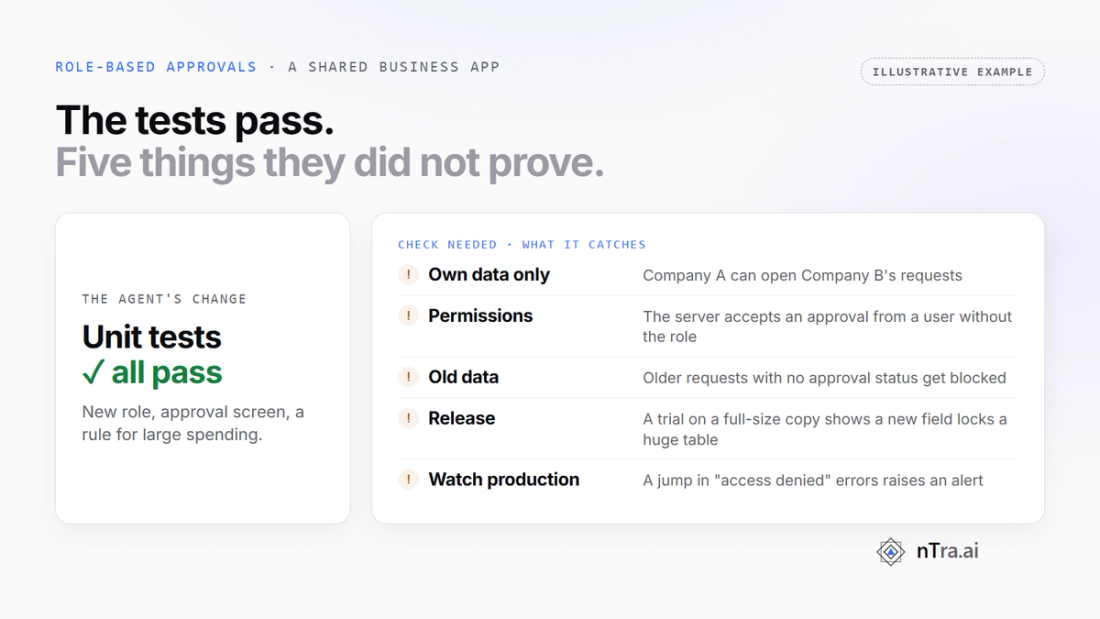
An agent produces the change in an hour. It adds the new role, an approval screen, a rule that blocks large spending without sign-off, and a dozen unit tests. All of them pass.
Here is what those tests did not prove, and what a check for each would catch.
- Each company sees only its own data. The approval list was looked up by request number alone. A check that signs in as Company A and asks for Company B's requests catches it.
- Permissions. The "approve" button was hidden for normal users, but the server still accepted the action. A check that sends the approval directly, as a user without the role, catches it.
- Old data still works. Older spending requests had no approval status. The new rule treated them as "not approved" and blocked them. A check against old, realistic sample data catches it.
- Release. The change adds a new field to a very large table. A trial run on a full-size copy shows how long that table is locked, before release night.
- Watching production. After release, a jump in "access denied" errors could mean the new rule blocks real users. An alert on that number catches it in minutes, not days.
None of these needs a smarter agent. Each one needs someone to decide, up front, that it must be proven. And it needs a place where that proof is kept.
Where nTra fits
nTra is one way to coordinate this path, from the first request to a checked merge. Your own release and production tools handle what comes next. Other tools cover parts of it well, and many teams combine several.
Here is what nTra does today, in plain terms:
- Nothing is planned until you approve it. nTra plans tasks only after a person approves what to build, or a design.
- The checks are run again. On a normal task, by default, nTra runs the checks the coding agent reported again. The fresh results decide, not the agent's word.
- Every agreed point needs proof. Every agreed point must be proven before the change joins the main code. If a point needs a person to judge it, nTra sends it to a person for review.
- Known key types are caught. nTra looks for known key types, such as AWS keys and GitHub tokens. A match fails the check.
- A person approves the merge. If nTra merges the change into the main code, a person approves it first.
- Your laptop or nTra's cloud. Work can run on your own computer, or in nTra's cloud on a fresh machine for each job.
What nTra does not do
Honest limits matter more than a feature list.
- It does not roll out your release. nTra's work ends at the merge. Your own release pipeline still ships the change.
- It runs the checks that exist. It re-runs the checks the agent reported, or the ones your team set. If nobody wrote a check for company data, nTra cannot run one.
- A team can change the default. A project can swap the default check for its own command, or turn it off.
- The key scan has limits. It catches known key shapes, not every secret. A plain password in a settings file can slip past.
- People still decide. Someone must approve the plan, judge the risky parts of a change and approve the merge.
Back to Tuesday's feature. A faster agent would not have saved it. A written agreement saying "each company sees only its own approvals", and a check that proved it, would have.
That is the real work of delivering enterprise software with AI. Writing the code is now the easy part.